How to Choose the Right Charger for Your Smartphone: A Full Guide
Walking into an electronics store or browsing online for a phone charger used to be simple. You picked up a brick, plugged it in, and it worked. Today, with manufacturers ditching the charging bricks in the box and introducing complex fast-charging standards, finding the right plug can feel like decoding a physics puzzle.
If you use the wrong charger, you might end up waiting hours for a full battery—or worse, degrading your phone's lifespan. Here is how to pick the perfect match for your device.
1. Check the Wattage (The Speed Limit)
The absolute first thing you need to look at is the wattage (W). Think of wattage as the overall speed of the charger. The formula is straightforward:
{Wattage } (W) = {Voltage } (V) X {Amperage } (A)
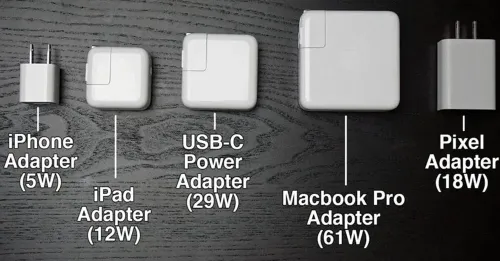
Most modern smartphones support fast charging, but they all have a maximum cap. For example, older iPhones cap out around 20W to 27W, while many Samsung devices accept 25W or 45W. Certain Android brands can even handle upwards of 65W or 100W.
The Golden Rule: You cannot "overcharge" a modern smartphone with a high-wattage brick. If you plug a 25W iPhone into a massive 100W laptop charger, the phone will safely pull only the 25W it needs. However, if you use an underpowered 5W charger, your phone will charge at a absolute crawl.
2. Match the Fast-Charging Standard
Wattage alone isn't enough; the charger and the phone must speak the same language. The most universal language today is USB Power Delivery (USB-PD)
iPhones and Google Pixel: These devices rely almost entirely on the standard USB-PD profile.
Samsung: Uses a specific variation of USB-PD called PPS (Programmable Power Supply). If you want Samsung’s "Super Fast Charging 2.0" 45W, your brick must explicitly state it supports USB-PD PPS.
Proprietary Brands (OnePlus, Xiaomi): These brands often use custom standards (like SuperVOOC or HyperCharge). To get their blistering speeds, you generally need to buy the official brand-name brick.
3. Choose the Right Cable
A charger is only as good as the cord attached to it. If you plug a high-end 65W brick into a cheap, thin gas-station cable, the cable will throttle the energy flow to safe limits (usually 60W or much lower). Look for a high-quality USB-C to USB-C or USB-C to Lightning cable rated for the specific wattage you want to achieve.
Final Takeaway
To keep it simple, check your phone manual online to find its maximum charging intake (e.g., 45W. Then, buy a reputable third-party GaN (Gallium Nitride) charger that offers at least that wattage and lists USB-PD compatibility. GaN chargers are smaller, run cooler, and safely optimize power delivery, keeping your battery healthy for years to come.